MOVE ME EGYPT SERVICES
Physical moving for corporate servers
Servers and network equipment need an accurate inventory and clear responsibilities before they move. We coordinate physical packing, labels and transport after a site review with the client IT team. This service is not digital data migration or systems administration.
Physical equipment relocation, not data migration
This service concerns agreed packing, identification, handling and transport of server and network equipment. It does not include system administration, credentials, backups or configuration. Appoint an IT owner to decide what moves, what needs the manufacturer and what must remain under company custody.
A standalone server, an empty cabinet and a populated rack are different loads. Provide asset numbers, models, dimensions, weights, warranty conditions and manufacturer transport instructions. A rack moving on casters inside a room is not proof that it can be shipped fully populated. Preparation and transport method require individual review.
Make the IT release point explicit
The client's IT team verifies backups and recovery arrangements, approves downtime, shuts systems down and documents connections. It disconnects equipment and removes sensitive media or components where its policy or manufacturer requires. The transport team does not need passwords and does not promise automatic restoration of services.
The technical owner confirms readiness for handling, with loose cables and components addressed. Declare UPS units and batteries in advance because weight and carriage conditions may differ. Missing asset records or shipping instructions call for clarification, not experimentation with live business equipment.
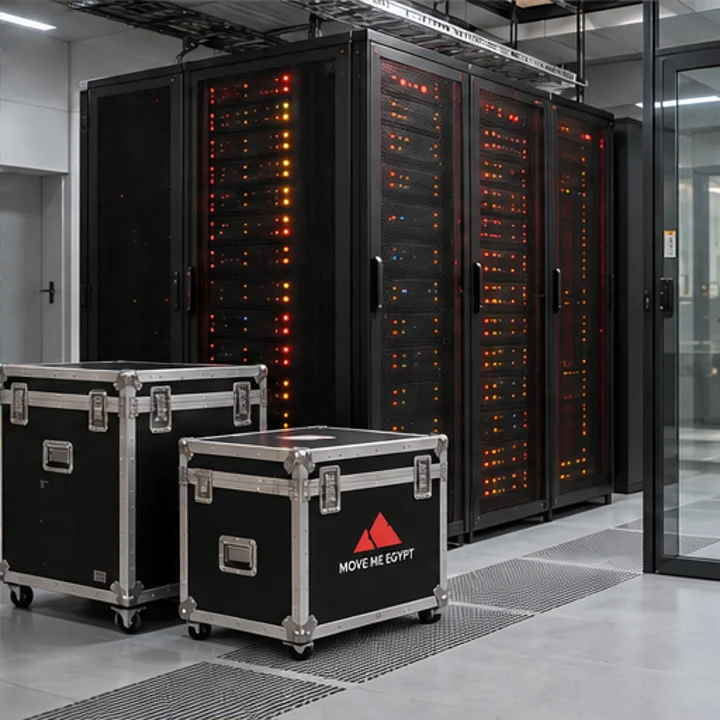
Protect hardware and keep accessories traceable
Protection depends on model, sensitivity and manufacturer guidance, including impact and vibration considerations and avoiding pressure on ports, controls and projecting parts. Electronic components may need materials different from ordinary furniture wrapping. Specific materials or certifications must be agreed, not assumed for every job.
Use an identifier linked to the receiving location for each device. Approved rails, fixings and cables travel in identified containers associated with that asset. External labels should not expose sensitive system names or confidential information. The client retains the technical connection map separately from the handling inventory.
Check room access and the downtime window
Survey server-room doors, thresholds, corridors, lifts and the route to the vehicle at both sites. Confirm load restrictions and security procedures with building management. Share only necessary route photographs, excluding sensitive screens or information that does not help assess handling.
Define the receiving contact and secure staging position so equipment is not left in a public corridor. Power, cooling, network readiness and their testing belong to the client and its suppliers. If the destination is delayed, review waiting or storage arrangements explicitly; ordinary furniture storage is not automatically suitable for sensitive electronics.
Receipt is not technical acceptance
Physical handover checks asset and package numbers, accessories and visible condition with the agreed representative. Rack installation, reconnection, service testing and permission to energise belong to the technical team. The transport team cannot certify the integrity of data or application operation.
Review any equipment insurance, exclusions and data-related limits in writing in the quotation and relevant policy. Do not assume comprehensive cover or a guaranteed recovery time. Price and acceptance depend on inventory, packaging, route, access windows and the division of responsibility, not employee count or rack count alone.
The survey: counting what a server room actually holds
A server room looks compact and quotes large. The reason is density: more value, fragility and dependency per square meter than anywhere else in an office, plus the cables, rails, shelves and spares that hide in every rack's shadow. Our survey of a server room is therefore slower per room than any other walkthrough we do, and deliberately so, because everything downstream, packing material, crew size, vehicle space, the downtime plan, is sized from what this visit records.
What the survey records
The equipment list first: servers, switches, storage, UPS units, monitors, printers and the long tail of peripherals, each noted with condition and, where visible, serial numbers. The rack layout second: what is racked, what is standalone, what slides out on rails and what must be lifted. The cabling third, because a rack's cables are its memory, and moving without recording them is amnesia by choice. Then the buildings: elevators and their dimensions, corridors, door clearances, stairs if it comes to that, loading access at both addresses, and any building rules about timing, protection or permits. Finally the people: who owns the shutdown decision, who travels with the equipment, who accepts at the far end.
What the survey produces
A written plan, not a number on a phone call. The equipment and cable inventory as the baseline document. The packing specification per item class, anti-static, crated, blanketed. The sequence: what powers down first, what loads last, what rides in which vehicle. The crew and timing against your downtime window. And the quote, itemized, so that what is included is written and what is not is equally written. A server move quoted without this visit is a guess with an invoice attached; the survey is what turns it into an operation.
Packing IT hardware: anti-static, crated and traceable
IT hardware has two enemies in a move, and impact is only the second. The first is electrostatic discharge, invisible, instant and fatal to components that show no mark. Professional packing of servers and network gear is built around both: anti-static against the invisible, cushioning and rigging against the visible.
Anti-static is the baseline, not an upgrade
Every board-bearing device is wrapped in anti-static material before anything else touches it: anti-static bags or wrap directly on the unit, never ordinary plastic film, which is itself a static generator. Only then come the cushioning layers and the carton or crate. Cables and small accessories go into anti-static or plain bags by sensitivity, labeled to their device. This order of operations is not negotiable in our crews, because a server that arrives with a latent discharge fault fails next Tuesday, in production, when nobody suspects the move.
Cartons, crates and the original boxes
Original manufacturer boxes with their foam are the best packaging ever made for that device, and where a client kept them, we use them. Where they are gone, and they usually are, double-walled cartons with foam-in-place or dense padding handle the smaller gear; servers, storage arrays and UPS units travel in wooden crates or rigid transport cases, screwed shut, with shock indicators on request. Monitors travel upright in screen cartons, face protected, never flat under weight. UPS batteries get their own conversation: heavy, sometimes restricted, occasionally better replaced than moved, and we say which at the survey.
Traceability is part of packing
Every package leaves the rack with three identities: its device, its contents, its destination position in the new room, all on the label and all on the inventory. A server move fails most often not with breakage but with confusion, forty similar black boxes arriving into an unlabeled pile. Labeling at packing time is what makes the far end an assembly exercise instead of an identification parade, and it costs nothing except the discipline to do it before the carton closes.
Planning around the downtime window
Every server move is really two moves: the physical one we perform, and the operational one your business lives through. The operational one is measured in downtime, and the entire plan bends around it. The question that starts the planning is not how fast can we carry, but how long can you be down, and the answer shapes everything.
Sequence is the lever
When downtime must be minimal, sequence does the work: non-critical systems power down and move first, core systems last, so the window in which the business is actually offline shrinks to the final shutdown and the first power-up. When the move can run over a weekend or overnight, the pressure reverses, and we can pack with more ceremony and transport in more, lighter trips. Staged moves split the difference: development and archive gear moves days ahead, production moves in one tight window.
The honest limits of speed
What we will not do is promise a downtime figure. The physical leg, power-down to arrival, we can estimate tightly from the survey. The power-up leg belongs to your IT team and their vendors: cabling, boot sequences, network handover, application checks. Our commitment is to the part we control, arriving inside the agreed window with everything intact and positioned, and to shrinking that window with preparation rather than with haste at the rack, which is where haste is most expensive.
Cabling: the memory of the rack, written down
Ask anyone who has rebuilt a server room what they would do differently and the answer is always the same: label the cables. A rack in operation is a working diagram; unplugged without a record, it becomes a puzzle with business hours as the timer. Our handling of cabling is built so the puzzle never forms.
Photograph first, label both ends
Before anything disconnects, every rack face is photographed, close enough to read port numbers. Then each cable is labeled at both ends before it leaves a port: device to device, port to port, on printed or written tags that survive the move. The photographs and the tags are redundant on purpose, either one alone rebuilds the rack, together they rebuild it fast. Cable bundles are bagged per device or per rack row, not thrown in a common bin, because a sorted cable is a connected cable.
What moves and what does not
Structured cabling, the fixed runs in walls and trays, stays with the building; patch cords, power cables and the rack's own wiring travel. The survey distinguishes them, and the inventory lists what moved, so nothing is searched for in a wall that was never going to contain it. Where the new room's structured cabling is part of the project, that is your IT contractor's scope; we coordinate positions and timing with them so the racks arrive to a room ready to receive them.
Is the new room ready to receive the equipment
The most avoidable delay in a server move is a truck arriving at a room that cannot accept it: power not yet live, racks not yet anchored, air conditioning still a plan. Equipment that cannot be installed on arrival sits in its crates, in a corridor, on a deadline, which is the one place expensive electronics should never be. Readiness is checked before load-out, not after arrival.
The readiness list
Power: circuits live, capacity confirmed against the equipment list, UPS positions identified. Cooling: the room holds temperature, because servers that arrive into a warm room and power up anyway are a repair invoice being written. Positioning: rack locations marked on the floor, so placement is execution, not debate. Access: the route from loading dock to room measured and cleared, elevators booked where the building requires it. And people: the receiving contact named, with authority to accept and to direct placement.
When the room is not ready
Honest options, in order of preference: shift the move date, which costs a phone call; stage into a ready holding area at the new site, which costs a second handling; or store the equipment with us until the room is ready, which converts the delay into warehousing instead of risk. What we will not agree to is delivery into a room we can see is unready, because the crates-in-a-corridor scenario ends in exactly the kinds of damage this page exists to prevent, and rescheduling is always cheaper than repair.
Who does what: the honest division of labor
A server move succeeds when three parties each do exactly their part and nobody's part is assumed. The three are your IT team, any specialist vendors, and us. The plan assigns every task to one of them by name, because the dangerous sentence in a server move is I thought you were doing that.
Your IT team owns the data and the systems
Backups before anything powers down, verified backups, not scheduled ones assumed to have run. Shutdown and startup sequences, in the right order. Configuration, credentials, licensing, network settings, application checks. These are yours not by contract but by nature: no mover, however careful, should hold your root passwords or judge whether your database came up clean. We ask for a named IT owner, one person whose yes releases the equipment to us and whose yes accepts it back.
Vendors own warranty and specialized handling
Some equipment must be decommissioned or packed by its manufacturer or support vendor to keep warranty and support valid; certain storage systems and large UPS units are the usual cases. The survey identifies these, and the plan schedules the vendor's visit ahead of ours, so their work finishes before our packing begins, never the same hour, which is how critical steps get skipped.
We own the physical arc
Packing to the specification, crating, labeling, the inventory, protection of the buildings at both ends, loading, transport with the right vehicle and restraint, positioning in the new room to the marked plan, and unpacking to the point of handover. What we deliberately do not touch: anything that requires system knowledge, because the honest boundary of a mover's competence is the strongest protection your systems have. Where the boundary is unclear for a specific device, we ask rather than improvise.
Risk, cover and the honest framing of both
Server equipment concentrates value the way few loads do, and a straight conversation about risk is part of the service. The conversation has three parts: how damage is prevented, how it is covered if prevention fails, and what the cover does not promise.
Prevention is the real insurance
Everything earlier on this page is prevention: the survey that sizes the job, anti-static discipline, crates, cable records, readiness checks, restraint in the vehicle. A move planned this way makes damage a rare event, which is the only honest starting point for talking about cover, because cover priced against careless handling is expensive for exactly the right reason.
Cover, stated plainly
Equipment packed by us travels under our full insurance frame, scaled to the values your inventory declares, which is why declared values belong on the inventory in writing, not in a phone call. Self-packed equipment is covered for its journey's handling, not its internal packing, the same physics-and-fairness rule as household cartons. What no mover's cover includes is consequential loss: the business cost of a day offline. That risk lives in your downtime planning and your backups, which is why this page treats them as part of the move rather than as someone else's topic.
If something does happen
The inventory and condition notes make the difference between a claim and an argument: what the item was, what state it left in, what state it arrived in. Report promptly, keep the packing, and the record does the talking. We would rather write this chapter before the move than have it read for the first time after one, and so far the planning chapters above are why it so rarely needs reading at all.
Server moves inside a larger office relocation
Most server rooms do not move alone; they move as the critical path of an office relocation. That changes the planning in useful ways, because the office move supplies the scaffolding, surveys, building coordination, crew scheduling, into which the server leg slots as its most carefully timed chapter.
The server leg sets the date, not the furniture
In a combined move, the sequence inverts the usual instinct: plan the server window first, then schedule everything else around it. Furniture and workstations can move across several days; the server window is the fixed point. Typically the office moves and operates from the new site while the server room makes its tight, separate transit, or the servers move last, into a room already built out by the main move. Either way, one inventory, one project plan, one point of contact, with the server chapter clearly fenced inside it.
Workstations are the volume around the core
Around the server room sits the everyday estate: desks, chairs, screens, docking stations, the personal cartons of a whole staff. These follow the office-move disciplines of this company's commercial services, labeled per workstation, accessories bagged per person, floor plans mirrored at the far end, while the server equipment follows the disciplines of this page. One crew, two playbooks, and the boundary between them written into the plan so that a desk chair never travels on server protocol and a core switch never travels on chair protocol.
Where to go next
If the server room is one chapter of a bigger move, start with the commercial moving and corporate relocation pages for the wider frame, then return here for the critical path. If the room moves alone, this page and a survey are the whole road. Either way the first step is the same: a site review with your IT owner in the room, because that conversation is where a server move stops being a risk and becomes a plan.
Transport: the vehicle, the restraint, the route
Between the two rooms lies the road, and the road has its own physics. Potholes, speed bumps, braking, cornering: a server in a vehicle experiences forces no office ever applies. Transport planning for IT equipment is the discipline of making those forces boring.
The vehicle and how it is loaded
Crated and cartoned IT equipment travels in closed vehicles, loaded against engineered restraint: strapped to anchor points, blocked so nothing slides, cushioned so nothing resonates. Heavy items ride low and forward; nothing stacks on a crate that was not built for stacking; the load plan is drawn before the first crate moves, not negotiated at the tailgate. Air-ride suspension is specified where the load justifies it, and the survey's equipment list is what makes that justification explicit rather than a guess.
The route is chosen, not defaulted
For sensitive loads the route is part of the plan: known roads over unknown shortcuts, speed bumps taken at walking pace, timing that avoids both rush hour and the small hours when lighting and security thin out. On intercity legs the route decision gets more weight, not less, because an hour saved on a bad road is the worst trade in logistics. The driver knows what the load is; a truck full of servers is not driven like a truck full of furniture, and ours are told which they are carrying before the engine starts.
Arrival is a handover, not a dump
At the new site the sequence reverses with the same discipline: crates to the room by the cleared route, opened in place, each item checked against the inventory and its condition note, positioned to the floor plan, packing materials removed. The handover to your IT owner happens item by item, signatures on the same document that opened the move, so the arc that began at the survey closes with a record, not a shrug.
Timing: when in the week and the year to move servers
The calendar matters more to a server move than to any other kind, because the load is intolerant and the stakeholders are many. Two clocks govern the date: your business cycle and Cairo's practical one, and the good date respects both.
The business clock
The right window is your quietest: after close of business for small rooms, over a weekend for most, across a holiday stretch for the largest. Avoid the days your systems work hardest, payroll runs, reporting deadlines, seasonal peaks, and the days your IT team is thinnest. The downtime chapter applies, but the calendar is where it is executed: the same plan lands very differently on a Tuesday morning than on a Friday night.
The practical clock
Cairo adds its own considerations. Summer argues for early starts and closed vehicles, and for not leaving crated electronics sitting on a sunny dock. Ramadan shifts traffic rhythms and crew hours in ways a good schedule anticipates rather than discovers. Building rules decide more than clients expect: many towers restrict moves to specific hours and days, and the freight elevator booking can be the real constraint on the whole plan. We ask for these rules at the survey, because the building's calendar, once known, is easy to respect and expensive to learn late.
Booking lead time
A server move rewards early booking more than most services: two to four weeks lets the survey, the vendor visits, the building permissions and the crate supply all land without compression. Shorter is possible, and urgent happens, but urgency spends the slack that planning would have banked, and in this service slack is safety. If the date is fixed by a lease or a launch, work backward from it together; if it floats, we will propose the window the plan wants.
The small server room and the single rack
Not every server move is a data center. Most Egyptian businesses run something humbler: a rack in a ventilated closet, a pair of servers under the stairs of the back office, a comms cabinet on the wall. These moves are smaller, cheaper and faster, and they deserve the same discipline in miniature, because the business behind a single rack depends on it exactly as much.
Same rules, smaller scale
The survey still comes first, shorter, but complete: what the equipment is, how it is cabled, what the route and the new room look like. Photographs and cable labels still happen, because a small rack rebuilt from memory is still a puzzle, only a smaller one to be stuck on. Anti-static packing still applies. The IT release point still gets named. The difference is scale, not rigor: one vehicle, one crew, often one day, and a plan that fits on two pages instead of twenty.
The honest economics of a small move
A single-rack move prices like a small commercial job with an IT surcharge: the packing materials, the handling care and the downtime timing, not the rack count. Where the budget is tight, the survey finds the honest levers: your team packs the peripherals to our specification, we handle the servers and the rack; or the move rides in the same window as a larger office relocation and shares its fixed costs. What we will not trim is the short list that makes it safe, because on a single rack, one dropped server is not an incident rate; it is the whole quarter's IT budget on the floor.
Growing pains welcome
Many clients meet us at the single-rack stage and return when the closet has become a room. The inventory habit scales: a business that labeled its first rack's cables rebuilds its fifth without drama. Start the discipline small and it compounds, which is the most durable advice this page has to give.
Practical answers before you call
Do we need to shut everything down ourselves? Your IT team owns shutdown and startup, with our crew scheduled around their sequence; we do not power equipment on or off. Can you move a populated rack? Sometimes, after review; usually we unrack, pack individually and re-rack at the destination, because a populated rack in transit is weight, leverage and connectors all working against each other. Do you provide crates? Yes, sized from the survey, with anti-static packing included. How long does it take? A single rack often moves in a day; a full room runs one to three days depending on the window. What areas do you cover? Cairo and all of Egypt, moves any governorate to any governorate, with the route planned per the transport chapter. What does it cost? Only the survey answers honestly, and the survey is free.
When the move is not planned: emergency relocations
Some server moves arrive as emergencies: a water leak over the rack, an air-conditioning failure the landlord cannot fix, a lease ended badly, a building notice with a date on it. The discipline of this page does not evaporate under pressure; it compresses. The survey becomes a focused one-hour walkthrough. The inventory becomes a rapid photo-and-serial capture as packing proceeds. The downtime plan becomes a single honest conversation about what must run first.
What changes in an emergency is sequence and candor. Triage decides what moves first, the systems the business cannot breathe without. Temporary hosting or failover, where it exists, buys the hours that the road cannot. And we say plainly what compressed timelines cannot promise: the full crate-and-verify ceremony of a planned move gives way to protected speed, and the difference is agreed in writing before the first server moves. What never changes: anti-static discipline, labeled cables, the named IT owner and a written record, because an emergency is precisely when confusion costs most. If you are reading this with a leak overhead, call now; the checklist below is what we will ask you for on the phone.
The server move checklist, end to end
Everything on this page, gathered into the order it happens. Six weeks out or six hours, the shape holds: survey the room, inventory equipment and cables, name the IT owner and the receiving contact. Verify backups and photograph every rack face. Book the building windows and the freight elevators at both ends. Confirm the new room: power, cooling, positions marked. Schedule any warranty vendors ahead of the move, never inside it. Agree the downtime window and the sequence that shrinks it. Pack anti-static, crate what crates, label everything to its destination position. Load to the plan, transport the planned route, place to the floor marks. Hand over item by item against the inventory, and keep the record, because the next move, and there is always a next move, starts from it.
After the move: the first week in the new room
The move ends at handover, but the story runs one week longer, and it is worth planning. Day one belongs to your IT team: power-up, cabling from the labels, network, tests. Our part is to have left the room exactly as the floor plan drew it, packing cleared, spares and leftover materials collected, so the technical work starts in a clean space.
Keep the packing materials for a fortnight if storage allows: a device that fails in week one sometimes travels back under warranty, and its crate is its ticket. The inventory, condition notes and photographs go to your files as the baseline of the new room, and the spares, rails, screws, cable ties, get a labeled box of their own, because the first expansion always needs the part someone almost threw away. Then the retrospective, fifteen minutes with everyone who touched the move: what the next one should keep and what it should change. Server rooms move more often than their owners expect, companies grow, leases end, buildings age, and the team that wrote down its lessons is the team whose second move takes half the meetings of its first.
Security and chain of custody on the road
A truck full of servers is a truck full of data, even with the drives encrypted and the systems dark. We treat it that way. The custody chain is documented from the rack to the room: who packed, who loaded, who drove, who received, each hand signed on the inventory that opened with the survey. Sealed crates where the content justifies them, numbered seals recorded at both ends. Closed, locked vehicles, no unrelated stops, the planned route and the agreed timing. And where a client wants their own escort traveling with the load, an IT owner riding the cab or following the truck, the answer is yes, arranged at the survey rather than improvised at the gate. Security questions belong in the open, and the survey is where we invite them.
Multi-site moves: branches, consolidations and splits
Server equipment rarely moves between just two addresses anymore. Branches consolidate into a head office; a head office splits into a primary site and a disaster-recovery room; a company absorbs another and inherits its racks. These are the same disciplines multiplied, with one addition: a master inventory that spans every site, because equipment crossing between locations without a single ledger is how assets quietly disappear.
In a consolidation, each source room is surveyed and packed to the same standard, labeled not just to its device but to its destination position in the combined room, and the receiving room's layout is finalized before the first truck rolls. In a split, the division list, what goes where, is agreed in writing before packing, and each half's cables and accessories travel with their own equipment, never pooled. For moves spanning governorates, the transport chapter scales: route planning per leg, timing per site, and one project contact across the whole pattern so the left hand always knows where the right hand parked. The survey covers every site in one engagement, and the quote arrives as one document, because that is how the move will run.
Why businesses trust MOVE ME EGYPT with their server rooms
Because we are honest about the boundary: we are movers, and we move superbly, packing, crating, transport, placement, insured end to end, and we leave systems to the people who own them. Because our plans are written: inventory, sequence, window and quote on paper before anything powers down. Because our crews handle Cairo's buildings daily and know the difference between a server crate and a sofa crate in their hands, not just in a checklist. And because the survey is free and the questions are welcome. Bring us your room and your IT owner; we will bring the plan. MOVE ME EGYPT, the moving brand of INEX LOGISTIC, available around the clock, moves across every governorate in Egypt, starting from a conversation about yours.
When your IT team is not local
Plenty of businesses run their Cairo equipment under an IT team in another city or another country. The move still works; it just needs one extra role filled: the local hand with authority. Appoint one, a staff member, a local IT contractor, or a managed-services engineer, to hold the shutdown decision and the receiving acceptance. We coordinate directly with your remote team for sequences and checks while the local hand signs the physical handovers, and the inventory's photographs give the remote team eyes on every step they cannot attend.
Booking your server move
The next step costs nothing: a survey at your site with your IT owner present, producing the written inventory, sequence, window and itemized quote this page describes. Call or message us any time, the lines run around the clock, and bring the building rules and your downtime constraints to that first conversation; the earlier they are on the table, the better the plan.
A few more answers, briefly
Can we keep operating during the move? Yes, if the plan stages the move, non-critical systems travel first while production keeps running, and the downtime chapter shows how the window shrinks to the final switchover. Do you move data? No; we move the physical equipment that holds it, and your backups and configurations stay with your IT team by design. Do you move to other cities? Yes, across every Egyptian governorate, with the route planned for sensitive loads. Do you move racks themselves? Yes, emptied and wrapped, or populated only after individual review.
Final notes before the survey
Bring three things to the survey: your equipment list if one exists, the building rules for both addresses, and your downtime limits. With those in hand, the visit turns directly into the written plan this page promises, and the plan turns into the quietest day your server room will ever have.
Talk to us
Your server room is one survey away from a written plan. Contact MOVE ME EGYPT now and we will take it from there.
Ready when you are
The survey is free, the plan is written, and the lines never close.
What needs to be agreed
The client IT team owns backups, shutdown, cable disconnection, rack removal, reinstallation, reconnection and tests. Any separate specialist work must be agreed on its own terms. Batteries, power systems and cooling requirements need disclosure and review before acceptance. No uptime or technical performance guarantee is invented.
Prepare these details
- Provide asset numbers, dimensions, accessories and destination positions.
- Have the IT team approve packaging and manufacturer requirements.
- Agree the physical route, handling points and receiving checks.
- Keep backups and recovery procedures under your IT team control.
How the move is planned
Share the inventory
Send the collection and delivery locations, preferred date and a clear inventory. Photos help us identify missing information, but they do not automatically replace a site survey.
Review access and the scope
We review entrances, stairs, lifts and loading points, then identify packing, dismantling, transport and any work requiring another specialist.
Agree the quote and responsibilities
Check the included and excluded work, stages, contacts and receiving arrangements. Changes to the inventory or address need review before they become part of the plan.
Prepare, move and hand over
The team follows the agreed scope, with labels and inventory checks at delivery. Record visible observations at handover and keep important personal items with you.
Locations and availability
We welcome moving requests from all of Greater Cairo: Nasr City, New Cairo, the Fifth Settlement, the New Administrative Capital, 6th of October City, Sheikh Zayed, Maadi, Zamalek, Katameya Heights, Katameya Golf and New Giza. Our service covers every governorate in Egypt: Alexandria, the North Coast, Ain Sokhna, Suez, Hurghada, Sharm El Sheikh, El Gouna and beyond. We have worked everywhere in Egypt, and our crew reaches any address with the same planning and commitment. Send your area on WhatsApp and we will confirm the details and timing right away.
Survey and pricing
A quote depends on the inventory, volume, item type, distance, access and agreed packing, handling and assembly. We review the details and survey needs before a final offer. The household calculator is a planning tool, not a binding quote; it does not price company, factory, server, safe or piano moves, or inventories with unknown-volume items. Ask for the exact inclusions and exclusions before agreeing the work.
Frequently asked questions
Does an enquiry confirm a booking?
No. The team must review the request and agree the scope, availability and quote before the move is confirmed.
Is every task included automatically?
No. Packing, dismantling, handling, storage and specialist work depend on the written scope. Check the exclusions as well as the price.
What if my inventory or address changes?
Tell us before the move. A change can affect access, timing, equipment and price, so it needs review before acceptance.